# Remote Access

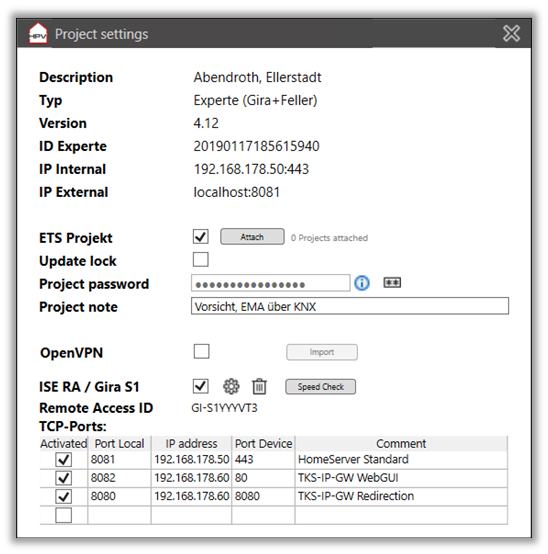
Remote accesses can be stored for each project, which can be checked into the memory on a project-specific basis and used by all computers and users. For some project types, you then have the choice of whether to use the internal IP addresses or the external path for integrated functions such as QC starters.

# Overview

[![image.png](https://wiki.smarthometools.de/uploads/images/gallery/2025-01/scaled-1680-/eV5image.png)](https://wiki.smarthometools.de/uploads/images/gallery/2025-01/eV5image.png)
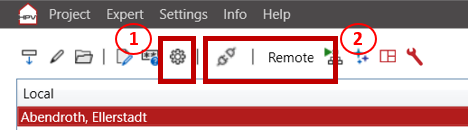
<span lang="EN-US" style="font-size: 9.0pt; line-height: 107%; mso-ascii-font-family: Calibri; mso-fareast-font-family: Calibri; mso-hansi-font-family: Calibri; mso-bidi-font-family: Calibri; mso-ansi-language: EN-US; mso-bidi-font-weight: bold;"><span style="mso-list: Ignore;">-<span style="font: 7.0pt 'Times New Roman';"> </span></span></span><span lang="EN-US" style="font-size: 9.0pt; line-height: 107%; mso-ansi-language: EN-US; mso-bidi-font-weight: bold;">"</span>**<span lang="EN-US" style="font-size: 9.0pt; line-height: 107%; mso-ansi-language: EN-US;">Project settings (#1)"</span>**<span lang="EN-US" style="font-size: 9.0pt; line-height: 107%; mso-ansi-language: EN-US; mso-bidi-font-weight: bold;"> This button takes you to the project-specific settings, e.g. to store the connection data and test the connection.</span>

<span lang="EN-US" style="font-size: 9.0pt; line-height: 107%; mso-ascii-font-family: Calibri; mso-fareast-font-family: Calibri; mso-hansi-font-family: Calibri; mso-bidi-font-family: Calibri; mso-ansi-language: EN-US; mso-bidi-font-weight: bold;"><span style="mso-list: Ignore;">-<span style="font: 7.0pt 'Times New Roman';"> </span></span></span><span lang="EN-US" style="font-size: 9.0pt; line-height: 107%; mso-ansi-language: EN-US; mso-bidi-font-weight: bold;">"</span>**<span lang="EN-US" style="font-size: 9.0pt; line-height: 107%; mso-ansi-language: EN-US;">Access type (#2)</span>**<span lang="EN-US" style="font-size: 9.0pt; line-height: 107%; mso-ansi-language: EN-US; mso-bidi-font-weight: bold;">" Choose between "Local" and "Remote" so that the online functions (debug page, QuadClient) use the correct connection. The S1/RA functions are only available with "Remote".</span>

<span lang="EN-US" style="font-size: 9.0pt; line-height: 107%; mso-ascii-font-family: Calibri; mso-fareast-font-family: Calibri; mso-hansi-font-family: Calibri; mso-bidi-font-family: Calibri; mso-ansi-language: EN-US; mso-bidi-font-weight: bold;"><span style="mso-list: Ignore;">-<span style="font: 7.0pt 'Times New Roman';"> </span></span></span><span lang="EN-US" style="font-size: 9.0pt; line-height: 107%; mso-ansi-language: EN-US; mso-bidi-font-weight: bold;">"</span>**<span lang="EN-US" style="font-size: 9.0pt; line-height: 107%; mso-ansi-language: EN-US;">Connect/Disconnect (#2)</span>**<span lang="EN-US" style="font-size: 9.0pt; line-height: 107%; mso-ansi-language: EN-US; mso-bidi-font-weight: bold;">" If the access data is stored, the connection is established and disconnected here.</span>

[![image.png](https://wiki.smarthometools.de/uploads/images/gallery/2025-01/scaled-1680-/uOmimage.png)](https://wiki.smarthometools.de/uploads/images/gallery/2025-01/uOmimage.png)

# Connection via Gira S1 or ISE Remote Access

<span lang="EN-US" style="font-size: 9.0pt; line-height: 107%; mso-ansi-language: EN-US; mso-bidi-font-weight: bold;">It is possible to establish direct connections to the system via a Gira S1 or ISE Remote Access. The KNX interfaces for ETS, for example, are automatically integrated and any TCP ports are forwarded to the customer's network participants.</span>

<span lang="EN-US" style="font-size: 11.0pt; line-height: 107%; font-family: 'Calibri',sans-serif; mso-ascii-theme-font: minor-latin; mso-fareast-font-family: Calibri; mso-fareast-theme-font: minor-latin; mso-hansi-theme-font: minor-latin; mso-bidi-font-family: 'Times New Roman'; mso-bidi-theme-font: minor-bidi; mso-ansi-language: EN-US; mso-fareast-language: EN-US; mso-bidi-language: AR-SA; mso-bidi-font-weight: bold;">  
</span><span lang="EN-US" style="font-size: 9.0pt; line-height: 107%; font-family: 'Calibri',sans-serif; mso-ascii-theme-font: minor-latin; mso-fareast-font-family: Calibri; mso-fareast-theme-font: minor-latin; mso-hansi-theme-font: minor-latin; mso-bidi-font-family: 'Times New Roman'; mso-bidi-theme-font: minor-bidi; mso-ansi-language: EN-US; mso-fareast-language: EN-US; mso-bidi-language: AR-SA; mso-bidi-font-weight: bold;">If the project type is "Expert", the Expert project is automatically scanned and common ports are set when remote access is activated. This applies to the classic standard ports of the visualization, logic debugger and DCS-IP gateway. Once the ports have been created automatically, they must be updated manually if changes are made.</span>

# OvenVPN

<span lang="EN-US" style="font-size: 9.0pt; line-height: 107%; color: black; mso-themecolor: text1; mso-ansi-language: EN-US; mso-bidi-font-weight: bold;">An OpenVPN configuration file can be added via the project settings. After selecting the project, you can establish a connection by setting the project to “Local” and pressing the connection button.<span style="mso-spacerun: yes;"> </span></span>

<span lang="EN-US" style="font-size: 9.0pt; line-height: 107%; color: black; mso-themecolor: text1; mso-ansi-language: EN-US; mso-bidi-font-weight: bold;">Requirement: </span>

<span lang="EN-US" style="font-size: 9.0pt; line-height: 107%; color: black; mso-themecolor: text1; mso-ansi-language: EN-US; mso-bidi-font-weight: bold;">OpenVPN GUI at least version 10.50.0.0.   
A parallel installation next to e.g. “OpenVPN Connect” is possible.</span>

<span lang="EN-US" style="font-size: 9.0pt; line-height: 107%; color: black; mso-themecolor: text1; mso-ansi-language: EN-US; mso-bidi-font-weight: bold;">See - </span>[<span lang="EN-US" style="font-size: 9.0pt; line-height: 107%; mso-ansi-language: EN-US; mso-bidi-font-weight: bold;">https://openvpn.net/community-downloads/</span>](https://openvpn.net/community-downloads/)