# Overview

<span lang="EN-US" style="font-size: 9.0pt; line-height: 107%; mso-ansi-language: EN-US;">The PM manages your SmartHome projects for perfect teamwork and automatically takes care of opening the correct software for editing, preventing simultaneous editing by others and providing all the necessary data and tools as well as notes, documentation and passwords required for the best possible project support. All project data can be stored on central data storage devices such as servers, NAS or cloud (OneDrive/SharePoint/Nextcloud/Dropbox/etc.), which serve as an exchange platform. Up to 10 different central storage locations can be configured and enable customized structuring to suit every company. This also makes it possible to exchange data with other companies. All processes are also recorded in log files and ensure end-to-end traceability. </span>

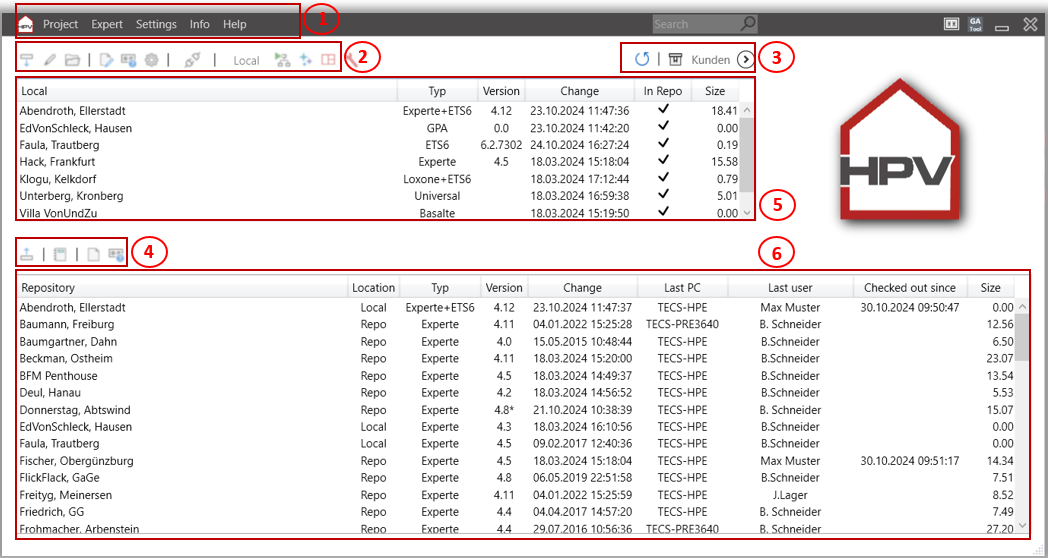
<span lang="EN-US" style="font-size: 9.0pt; line-height: 107%; mso-ansi-language: EN-US;">Main window of the Projektmanager</span>

[![image.png](https://wiki.smarthometools.de/uploads/images/gallery/2025-01/scaled-1680-/S7Uimage.png)](https://wiki.smarthometools.de/uploads/images/gallery/2025-01/S7Uimage.png)

<span style="font-size: 9.0pt; line-height: 107%; mso-bidi-font-family: Calibri; mso-bidi-theme-font: minor-latin;"><span style="mso-list: Ignore;">1.<span style="font: 7.0pt 'Times New Roman';"> </span></span></span><span style="font-size: 9.0pt; line-height: 107%;">Main menu</span>

<span lang="EN-US" style="font-size: 9.0pt; line-height: 107%; mso-bidi-font-family: Calibri; mso-bidi-theme-font: minor-latin; mso-ansi-language: EN-US;"><span style="mso-list: Ignore;">2.<span style="font: 7.0pt 'Times New Roman';"> </span></span></span><span lang="EN-US" style="font-size: 9.0pt; line-height: 107%; mso-ansi-language: EN-US;">Menu – „Local project selection“</span>

<span style="font-size: 9.0pt; line-height: 107%; mso-bidi-font-family: Calibri; mso-bidi-theme-font: minor-latin;"><span style="mso-list: Ignore;">3.<span style="font: 7.0pt 'Times New Roman';"> </span></span></span><span style="font-size: 9.0pt; line-height: 107%;">Menu – „Repository project selection“</span>

<span style="font-size: 9.0pt; line-height: 107%; mso-bidi-font-family: Calibri; mso-bidi-theme-font: minor-latin;"><span style="mso-list: Ignore;">4.<span style="font: 7.0pt 'Times New Roman';"> </span></span></span><span style="font-size: 9.0pt; line-height: 107%;">Menu – „Repository selection“</span>

<span lang="EN-US" style="font-size: 9.0pt; line-height: 107%; mso-bidi-font-family: Calibri; mso-bidi-theme-font: minor-latin; mso-ansi-language: EN-US;"><span style="mso-list: Ignore;">5.<span style="font: 7.0pt 'Times New Roman';"> </span></span></span><span lang="EN-US" style="font-size: 9.0pt; line-height: 107%; mso-ansi-language: EN-US;">List of projects that are checked out locally on the PC for editing.</span>

<span lang="EN-US" style="font-size: 9.0pt; line-height: 107%; mso-ansi-language: EN-US;"><span lang="EN-US" style="font-size: 9.0pt; line-height: 107%; mso-bidi-font-family: Calibri; mso-bidi-theme-font: minor-latin; mso-ansi-language: EN-US;"><span style="mso-list: Ignore;">6.<span style="font: 7.0pt 'Times New Roman';"> </span></span></span>List of projects that are available in the central repository for all users. </span>