# Trouble Shooting

<span lang="EN-US" style="font-size: 9.0pt; line-height: 107%; mso-ansi-language: EN-US;">If the PM does not behave as expected, the following points will help. If you have any further difficulties or questions, please contact </span>[<span lang="EN-US" style="font-size: 9.0pt; line-height: 107%; mso-ansi-language: EN-US;">HELPDESK@SmartHomeTools.de</span>](mailto:HELPDESK@SmartHomeTools.de)<span lang="EN-US" style="font-size: 9.0pt; line-height: 107%; mso-ansi-language: EN-US;">.</span>

<span lang="EN-US" style="font-size: 9.0pt; line-height: 107%; mso-bidi-font-family: Calibri; mso-bidi-theme-font: minor-latin; mso-ansi-language: EN-US;"> </span>

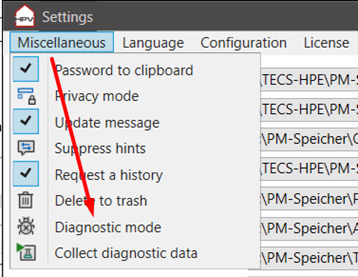
<span lang="EN-US" style="font-size: 9.0pt; line-height: 115%; mso-bidi-font-family: Calibri; mso-bidi-theme-font: minor-latin; mso-ansi-language: EN-US;"><span style="mso-list: Ignore;">1.<span style="font: 7.0pt 'Times New Roman';"> </span></span></span><span lang="EN-US" style="font-size: 9.0pt; line-height: 115%; mso-bidi-font-family: Calibri; mso-bidi-theme-font: minor-latin; mso-ansi-language: EN-US;">Activate the diagnostic mode in the settings menu and save the settings.   
The PM then starts in diagnostic mode.</span><span lang="EN-US" style="font-size: 9.0pt; line-height: 107%; mso-bidi-font-family: Calibri; mso-bidi-theme-font: minor-latin; mso-ansi-language: EN-US;"> </span>

<span style="mso-no-proof: yes;"> </span>

[![image.png](https://wiki.smarthometools.de/uploads/images/gallery/2025-01/scaled-1680-/kNOimage.png)](https://wiki.smarthometools.de/uploads/images/gallery/2025-01/kNOimage.png)<span style="font-size: 9.0pt; line-height: 107%; mso-bidi-font-family: Calibri; mso-bidi-theme-font: minor-latin;">  
</span>

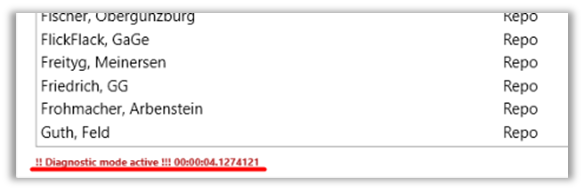
<span lang="EN-US" style="font-size: 9.0pt; line-height: 115%; mso-bidi-font-family: Calibri; mso-bidi-theme-font: minor-latin; mso-ansi-language: EN-US;"><span style="mso-list: Ignore;">2.<span style="font: 7.0pt 'Times New Roman';"> </span></span></span><span lang="EN-US" style="font-size: 9.0pt; line-height: 115%; mso-bidi-font-family: Calibri; mso-bidi-theme-font: minor-latin; mso-ansi-language: EN-US;">Check whether „Diagnostic mode active” is displayed in the footer.</span><span style="font-size: 9.0pt; line-height: 107%; mso-bidi-font-family: Calibri; mso-bidi-theme-font: minor-latin; mso-no-proof: yes;"> </span>

[![image.png](https://wiki.smarthometools.de/uploads/images/gallery/2025-01/scaled-1680-/JAkimage.png)](https://wiki.smarthometools.de/uploads/images/gallery/2025-01/JAkimage.png)<span lang="EN-US" style="font-size: 9.0pt; line-height: 107%; mso-bidi-font-family: Calibri; mso-bidi-theme-font: minor-latin; mso-ansi-language: EN-US;">  
</span>

<span lang="EN-US" style="font-size: 9.0pt; line-height: 115%; mso-bidi-font-family: Calibri; mso-bidi-theme-font: minor-latin; mso-ansi-language: EN-US;"><span style="mso-list: Ignore;">3.<span style="font: 7.0pt 'Times New Roman';"> </span></span></span><span lang="EN-US" style="font-size: 9.0pt; line-height: 115%; mso-bidi-font-family: Calibri; mso-bidi-theme-font: minor-latin; mso-ansi-language: EN-US;">The PM now records all actions and events. </span>

<span lang="EN-US" style="font-size: 9.0pt; line-height: 115%; mso-bidi-font-family: Calibri; mso-bidi-theme-font: minor-latin; mso-ansi-language: EN-US;">Recheck the error, then click on "Collect diagnostic data" and send the file with an error description to our helpdesk at </span>[<span lang="EN-US" style="font-size: 9.0pt; line-height: 115%; mso-bidi-font-family: Calibri; mso-bidi-theme-font: minor-latin; mso-ansi-language: EN-US;">https://helpdesk.SmartHomeTools.de</span>](https://helpdesk.SmartHomeTools.de)<span lang="EN-US" style="font-size: 9.0pt; line-height: 115%; mso-bidi-font-family: Calibri; mso-bidi-theme-font: minor-latin; mso-ansi-language: EN-US;">.</span>

<span lang="EN-US" style="font-size: 9.0pt; line-height: 107%; mso-ansi-language: EN-US;"> </span>

<span lang="EN-US" style="font-size: 9.0pt; line-height: 107%; mso-ansi-language: EN-US;">You can of course unzip the file in advance and edit it with a text editor, e.g. to delete customer-specific entries such as project names etc. before sending it.  
Access-relevant data is automatically made unrecognizable.</span>